MRP Gate العربية Ask for a demo

Material Requirements Planning (MRP) for factories

To deliver your production plan: what to buy, how much, from whom, and when?

MRP Gate calculates the raw materials your factory needs from the production plan, bills of materials, stock and open orders, and gives you supply orders ready for each vendor. It reads your data from Excel or from any database, in Arabic and English.

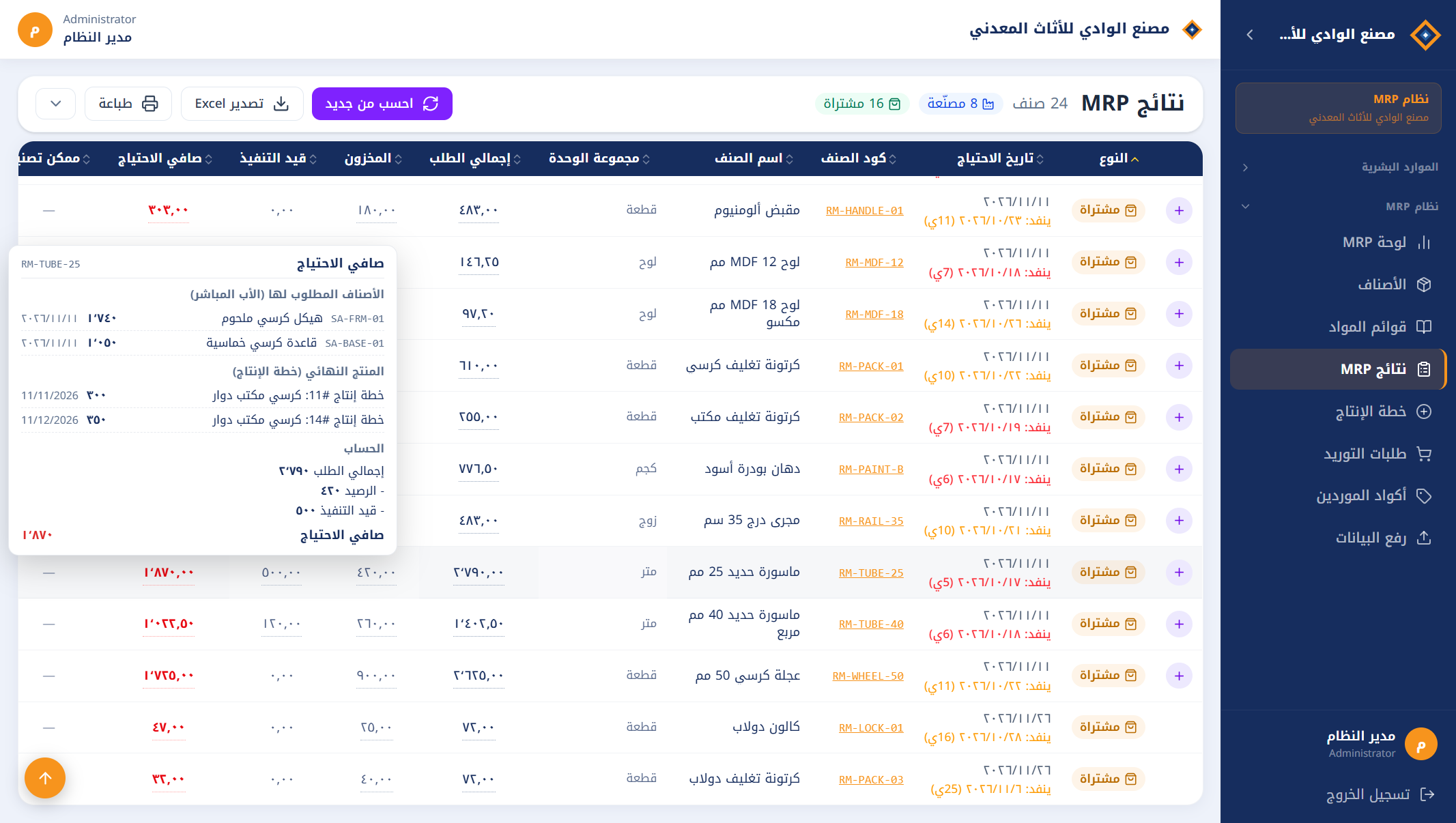
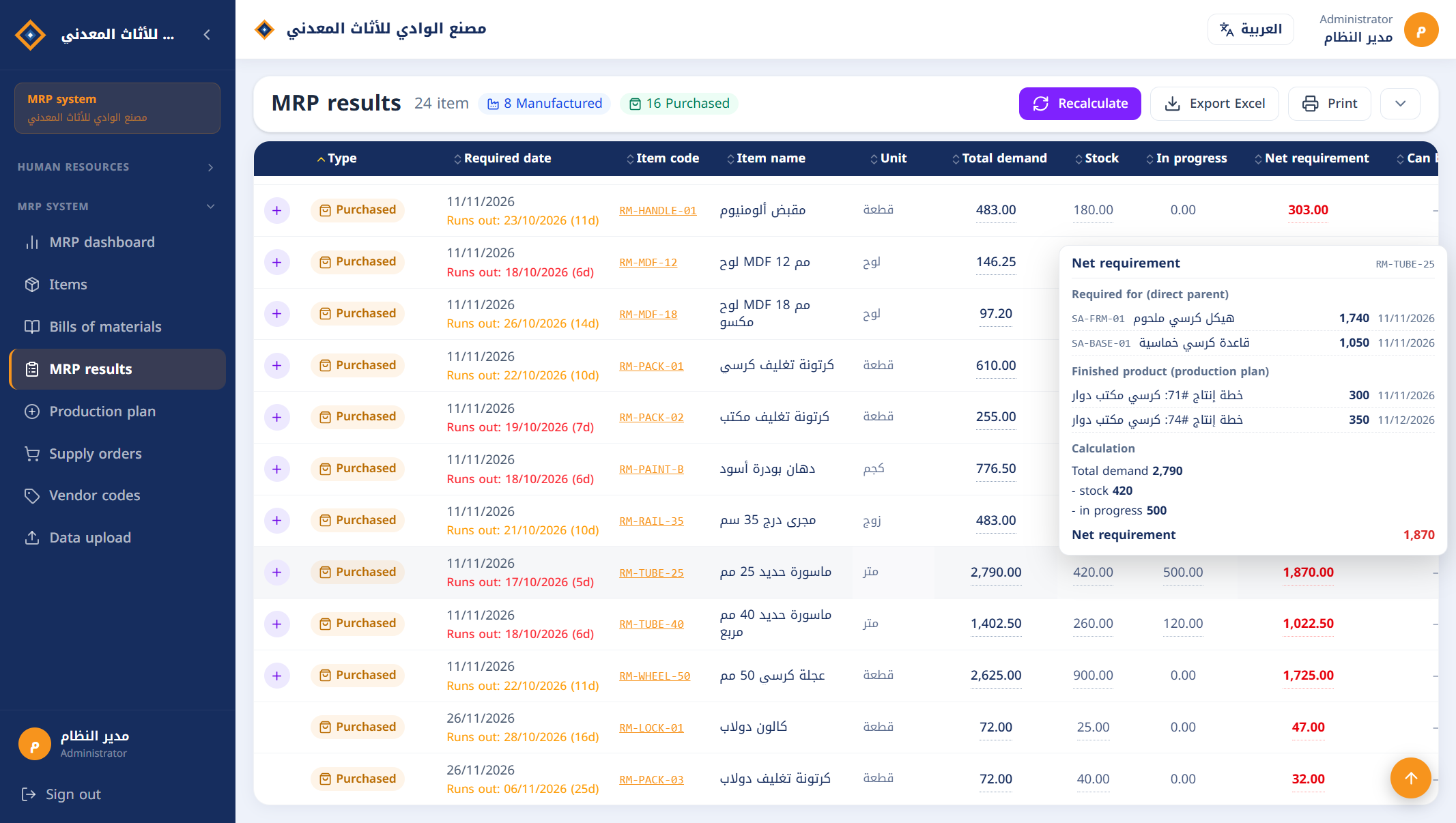
MRP results with the net requirement explanation card

If your planning still lives in Excel…

Most factories work out their requirements in sheets that are rebuilt from scratch every time. The result is familiar:

A missing material stops a line

The material goes into several products on several levels, and adding it up by hand is easy to get wrong.

Dead stock

Orders are sized for the whole plan, without netting off semi-finished stock and orders already on the way.

The same quantity ordered twice

Last week's purchase order is not part of this week's calculation.

"Where did this number come from?"

Nobody can trace the figure back to its source except the person who built the sheet.

Three steps

From the data you already have to a supply order ready for the vendor.

1

Data

From Excel files, straight from your system's database, or from SAP Business One: items, bills of materials, stock balances and open orders.

2

Production plan and calculation

Enter the products you need and their dates (by hand or from Excel), press "Recalculate", and get every material that is short.

3

Supply orders

For each vendor, the items that are short with the vendor's own code and price, exported to Excel and netted off automatically in the next calculation.

What makes the difference

Every screenshot is from the system itself, on the data of a sample metal furniture factory.

Every number is explained

Point at any figure in the results to see where it came from:

  • Which products asked for this material, and how much.
  • The original production plan lines.
  • The netting step by step: stock, then open orders.
  • The balance in each warehouse, and which warehouses are not counted.
Net requirement explanation card
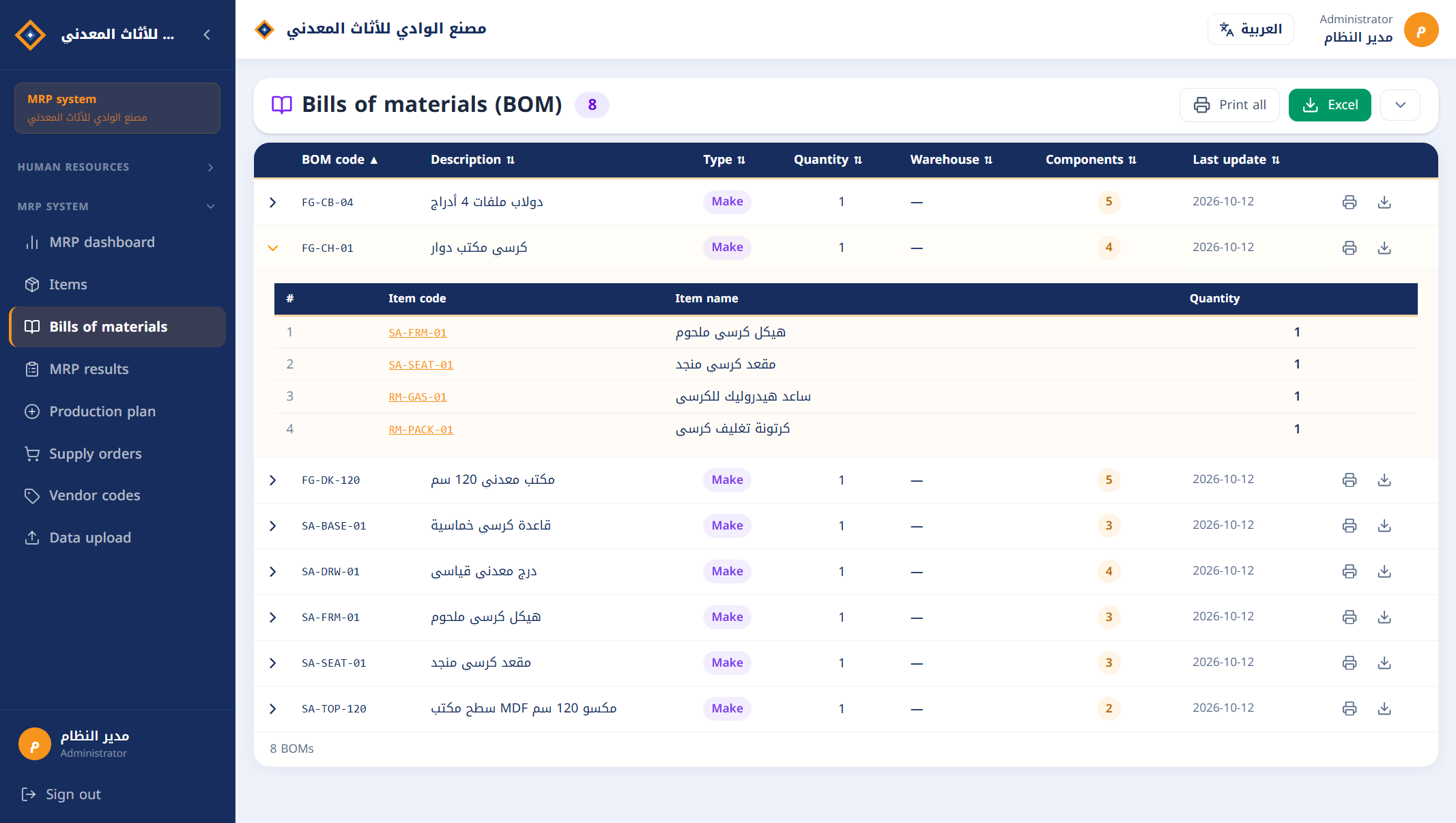
Bills of materials

Multi-level calculation done right

  • Bills of materials with any number of levels.
  • Components are required for what is actually short of the product after its own stock, not for the whole plan.
  • A material used in several products or levels has its demand added up and is calculated once.
  • "Can be made" report: how much you can produce now with the materials on hand.

Your data from any system, checked

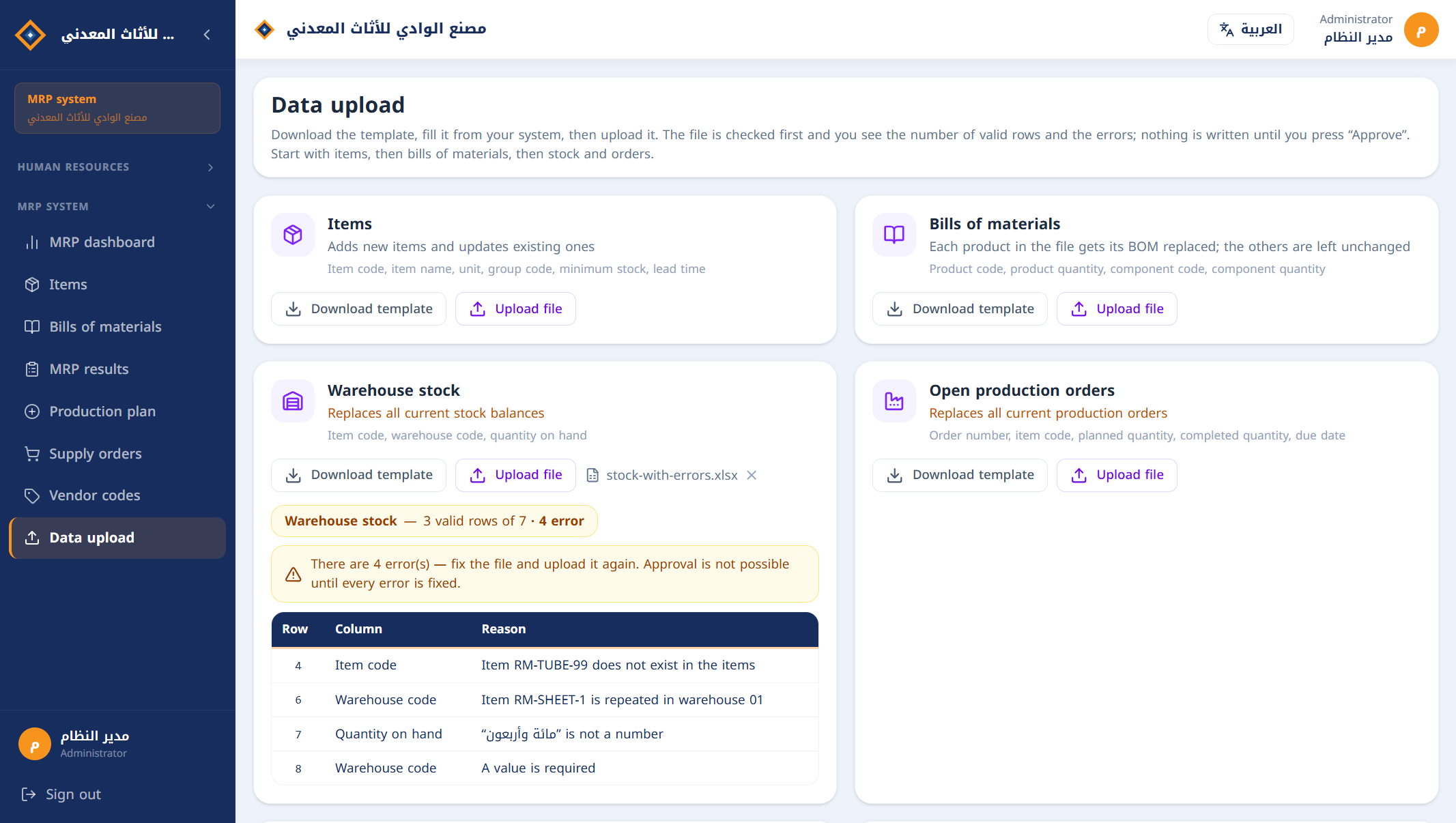
  • Simple Excel templates: download, fill, upload.
  • The file is checked before anything is written.
  • If there is an error: the row, the column and the reason.
  • Unknown items, duplicates and loops in bills of materials are rejected.
  • Order numbers stay as they are in your system, letters included.
Excel file check with the list of errors
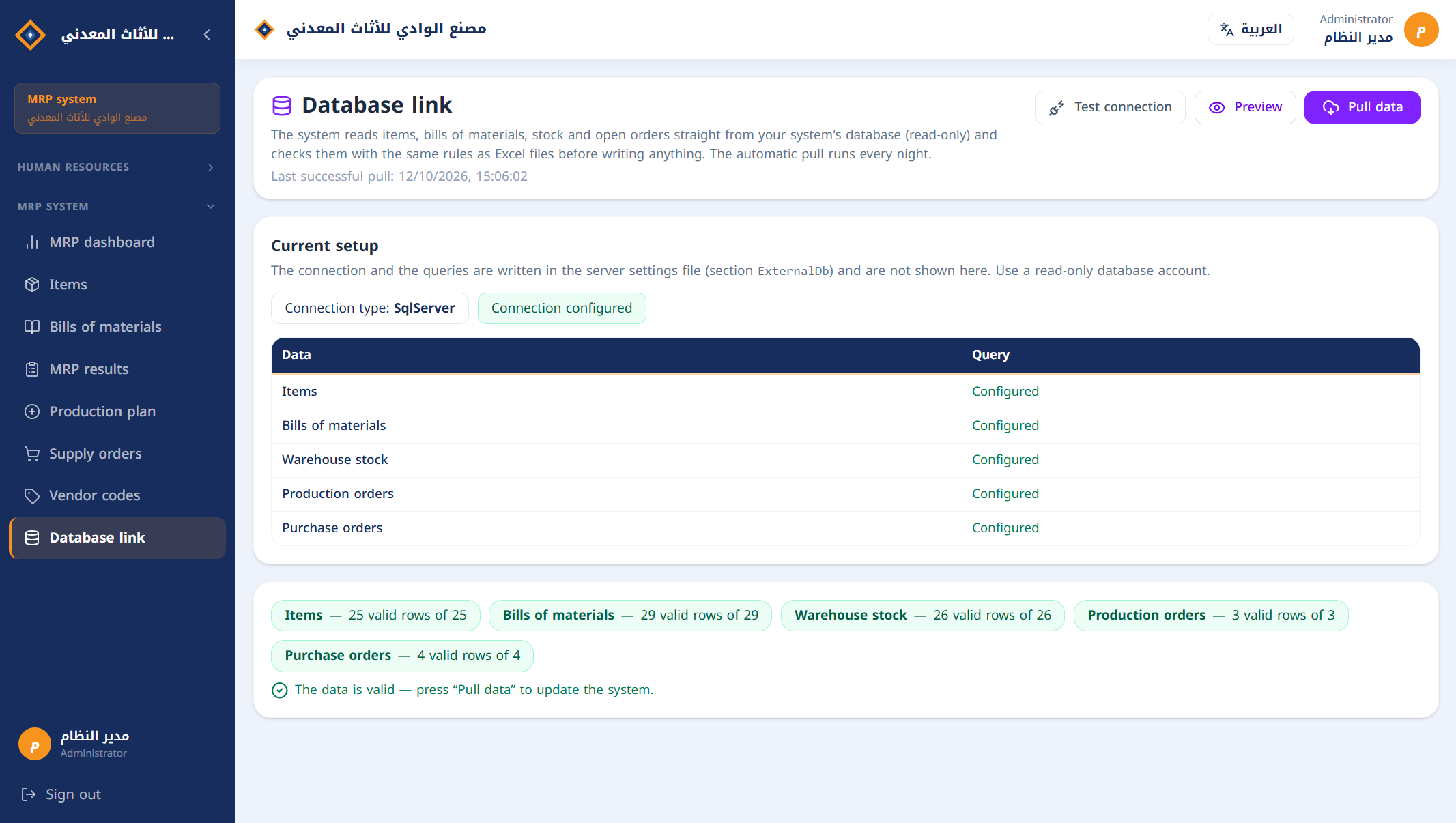
Database link

Or connect it straight to your database

  • The system reads from your current system's database: no files, no manual entry.
  • SQL Server directly, and any other database through ODBC (such as Oracle, MySQL and PostgreSQL).
  • Read-only: nothing is written to your system.
  • The same checks as Excel files before anything is updated.
  • Automatic pull every night, and manual whenever you want.

English and Arabic

  • The whole MRP interface in both languages, with one button to switch.
  • Direction, numbers and dates follow the language.
  • Templates, exported files and error messages in the user's language.
  • Each user chooses a language on their own device.
The interface in Arabic
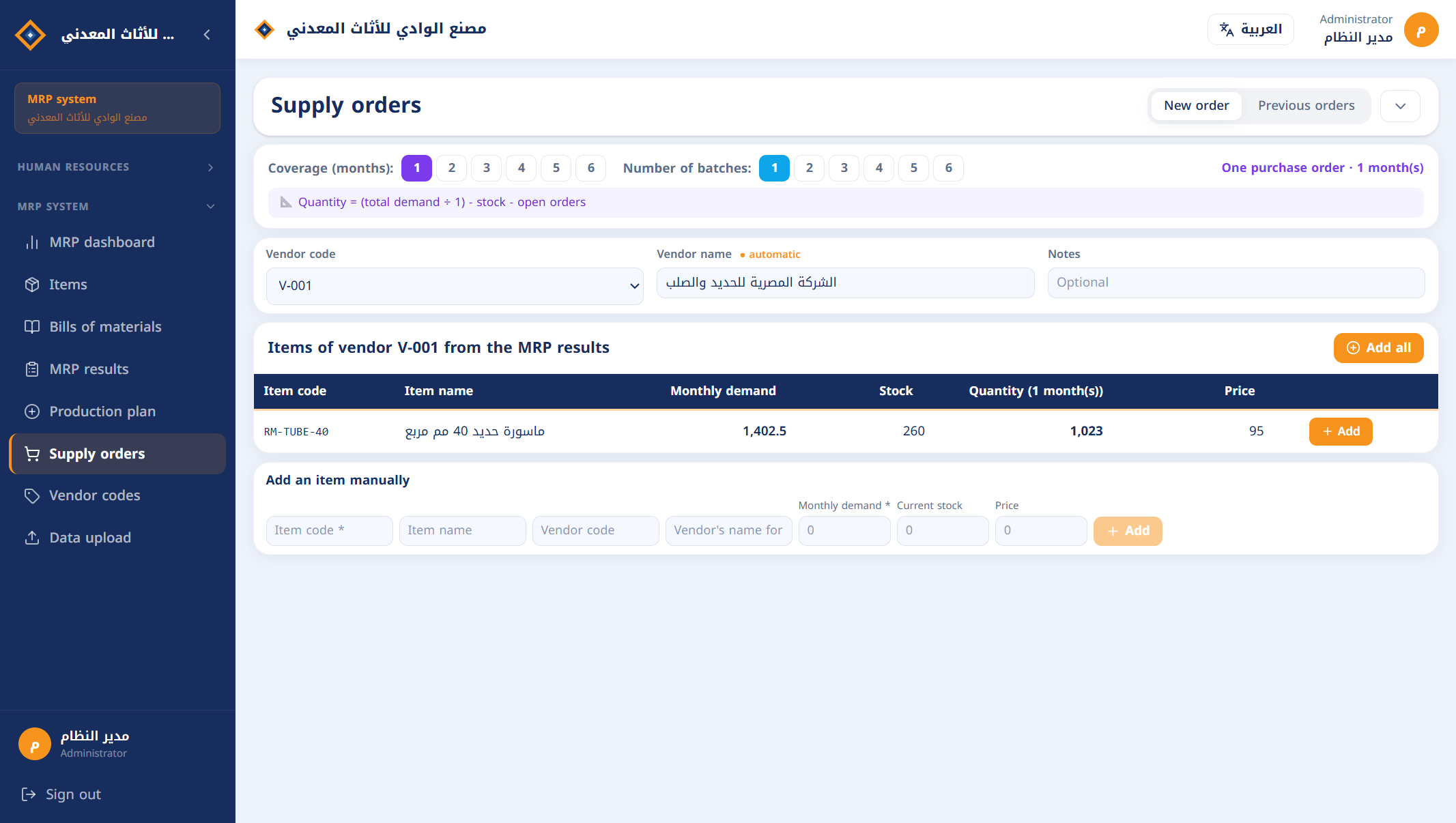
Creating a supply order

From the result to the supply order

  • Choose the vendor to see the items that are short, with quantity and price.
  • The order carries the item code and name as the vendor knows them.
  • Split into batches, with coverage from one to six months.
  • The system suggests the lowest-priced vendor for each item.
  • A saved order is netted off in the next calculation: no duplicate orders.

Try "what if"

Every production plan batch and every supply order has an on/off switch. Switch off, calculate and compare, without deleting anything.

Every run is kept

Go back to the results of any earlier run by its date.

Permissions per screen

Roles, each with view, add, edit, delete and reports on every screen.

Export and print

Excel export and printing from the results, items, bills of materials and supply order screens.

On your server

Installed inside the factory network on Windows and SQL Server, and opened from the browser. Your data does not leave.

HR module

Optional, licensed separately: attendance, leave and payroll (Arabic interface).

An example from the demo

A plan to make 650 office chairs. The 25 mm tube goes into the chair frame (3 m) and into its base (2 m), on two different levels of the bill of materials.

The system first netted off the stock of finished chairs, frames and bases, then calculated the tube for what was short only.

Required for the chair frame (580 × 3)1,740
Required for the chair base (525 × 2)1,050
Total demand2,790
− Stock420
− Open purchase order500
To buy (metres)1,870

Three ways in for the data, one system

The only difference is where the data comes from. The system is the same in all three.

Excel files

For any factory, with any accounting or inventory system.

  • Data from Excel files
  • No integration and no change to your current system
  • One workbook with everything, or a file per data type

Database link

For a factory whose system has a database and that wants no files.

  • SQL Server, or any database through ODBC
  • One read-only query per data type
  • Automatic pull every night

MRP Gate for SAP Business One

For factories running SAP B1.

  • Automatic sync every night, and manual on request
  • Items, bills of materials, stock per warehouse, production and purchase orders
  • Read-only: nothing is written to SAP

Frequently asked

What does MRP mean?

MRP stands for Material Requirements Planning: working out which raw materials and components have to be bought or made, in what quantities and by when, so the production plan is delivered without shortages or excess stock.

Do I have to change my current system?

No. The system takes its data from Excel files exported from your system, reads straight from its database, or from SAP Business One. In every case it is read-only.

Which databases can it connect to?

SQL Server directly, and any database that has an ODBC driver, such as Oracle, MySQL and PostgreSQL. The link is one read-only query per data type, which we prepare with you at installation.

Is the interface in English?

Yes. The MRP interface is in English and Arabic, and each user switches language with a button at the top of the screen.

What data do I need to start?

Five things: items, bills of materials, warehouse stock, open production orders and open purchase orders. Then vendor prices and the production plan.

Where is my data stored?

On a server inside your factory, in your own SQL Server database.

What if my bill of materials has several levels?

That is what the system is built for: it explodes the bills level by level and handles an item shared between several products.

Does it create purchase orders in my system?

It produces supply orders as Excel files for each vendor. Entering them in your purchasing system is done on your side.

How much does it cost?

The price is set after a short chat or call to understand what your factory needs. Message us on WhatsApp or call +20 100 146 6015.

Can I see it working before I decide?

Yes. The demo is run in front of you, from uploading the files to the supply order, and it can be done on a sample of your own data.
See it working on factory data

A live demo in about fifteen minutes: from Excel files to a supply order ready for the vendor.

WhatsApp